The Custom Criteria
Here, the UseToolCriteria example from the Fabric Documentation will be used (slightly modified to match vanilla naming standards).
public class UseToolTrigger extends SimpleCriterionTrigger<UseToolTrigger.TriggerInstance> {
    public void trigger(ServerPlayer player) {
        trigger(player, _ -> true);
    }

    @Override
    public Codec<UseToolTrigger.TriggerInstance> codec() {
        return TriggerInstance.CODEC;
    }

    public record TriggerInstance(Optional<Holder<LootItemCondition>> player) implements SimpleInstance {
        public static final Codec<UseToolTrigger.TriggerInstance> CODEC = RecordCodecBuilder.create(instance -> instance.group(
                LootItemCondition.CODEC.optionalFieldOf("player").forGetter(TriggerInstance::player)
        ).apply(instance, TriggerInstance::new));
    }
}Don't forget to register it:
public final class ExampleCriteriaTriggers {
    public static final UseToolTrigger USE_TOOL = Registry.register(
            BuiltInRegistries.TRIGGER_TYPES,
            Identifier.fromNamespaceAndPath(ExampleMod.MODID, "use_tool"),
            new UseToolTrigger()
    );

    public static void init() {}
}ExampleCriteriaTriggers.init(); // In your mod initializerYou'll need something to trigger this as well:
@Override
public void onInitialize() {
    PlayerBlockBreakEvents.AFTER.register((_, player, _, _, _) -> {
        if (player instanceof ServerPlayer serverPlayer) {
            ExampleCriteriaTriggers.USE_TOOL.trigger(serverPlayer);
        }
    });
}Using The Trigger
Let's try adding a research using our custom criterion:
{
  "title": "Custom Criterion!",
  "prerequisites": ["example:my_custom_research"],
  "to_unlock": {
    "count": 10,
    "criterion": {
      "trigger": "example:use_tool"
    }
  },
  "recipe_unlocks": ["minecraft:blaze_powder"],
  "rewards": [
    {
      "type": "researcher:fireworks",
      "amount": 2,
      "owned_by_player": false
    }
  ]
}In the UI:
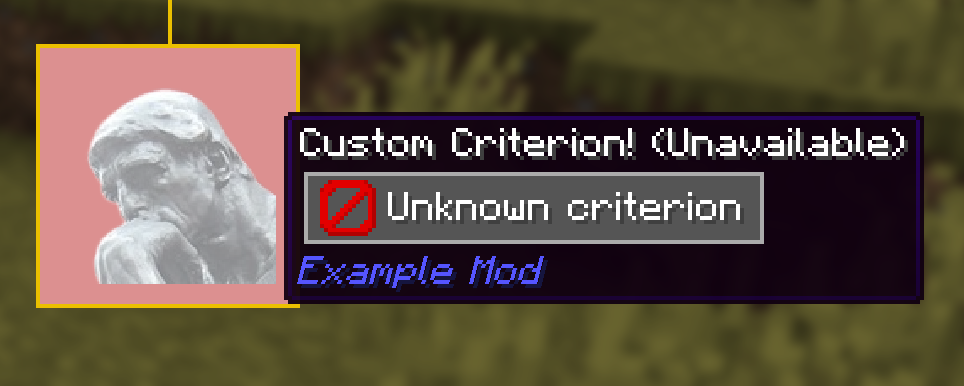
Oh no! The UI doesn't know what to do with our custom criterion, and is displaying an error.
INFO
The research having a red background here isn't because of our criteiron, but because we have prerequisites that haven't been fulfilled yet. (You can see a line coming out of the top of the node in the image.)
The Trigger Handler
To fix the errors in the UI, we need to add a TriggerHandler for our UseToolTrigger.
WARNING
TriggerHandlers should only exist on the client. Attempting to create one on the server will result in a crash.
public class UseToolTriggerHandler implements TriggerHandler<UseToolTrigger.TriggerInstance> {
    @Override
    public TriggerDisplayElement prepare(ResearchCriterion<UseToolTrigger.TriggerInstance> criterion) {
        // do something here
    }
}As you can see, we need to return a TriggerDisplayElement here.
What Are Trigger Display Elements
Researcher conveys criterion information by using TriggerDisplayElements, which can be lined up horizontally when rendering tooltips (and other things).
The most useful elements are:
TextElementfor rendering textItemElementfor rendering itemsSpacingElementfor spacing other elements apartGroupedElementto group elements together- This makes adding tooltips easier, and can be used in
TimedSwitchingElement.
- This makes adding tooltips easier, and can be used in
TimedSwitchingElementwhich loops through elements in a cycle- This can be used with
GroupedElementas well.
- This can be used with
TriggerDisplaydoesn't do much, but adds some padding around the sides
The Implementation
I'll just show you the result first:
    @Override
    public TriggerDisplayElement prepare(ResearchCriterion<UseToolTrigger.TriggerInstance> criterion) {
        IndentedTextHolder textHolder = new IndentedTextHolder();
        PredicateHelper.optionalTooltip(
                criterion.conditions().player(),
                EntityPredicateHelper::tooltip,
                Component.translatable("screen.researcher.predicate.player")
        ).ifPresent(textHolder::accept);

        TriggerDisplayElement textElement = new TextElement(textHolder.isEmpty() ? Component.literal("Break a Block") : Component.literal("Break a Block*"));
        if (!textHolder.isEmpty())
            textElement = textElement.withTextTooltip(textHolder.getText());

        return new TriggerDisplay(
                TriggerDisplay.makeCountElement(criterion),
                textElement
        );
    }
}Let's break it down.
IndentedTextHolder textHolder = new IndentedTextHolder();An IndentedTextHolder is a convenient way to store indented tooltips, useful for describing complex nested conditions and requirements for criterion.
PredicateHelper.optionalTooltip(
        criterion.conditions().player(),
        EntityPredicateHelper::tooltip,
        Component.translatable("screen.researcher.predicate.player")
).ifPresent(textHolder::accept);PredicateHelper#optionalTooltip is a helper function for conditions in an Optional field, which is being used here because the player conditions are optional.
EntityPredicateHelper#tooltip is another helper method that builds a tooltip that describes entity conditions. Component.translatable("screen.researcher.predicate.player") is the header for this tooltip.
Lastly, if the tooltip is present, it is added to textHolder.
TriggerDisplayElement textElement = new TextElement(textHolder.isEmpty() ? Component.literal("Break a Block") : Component.literal("Break a Block*"));Here, we create a TextElement. We add an asterisk to the end if the textHolder is not empty (which means there are player conditions for this trigger.)
if (!textHolder.isEmpty())
textElement = textElement.withTextTooltip(textHolder.getText());This adds the contents of textHolder as a tooltip to textElement.
return new TriggerDisplay(
        TriggerDisplay.makeCountElement(criterion),
        textElement
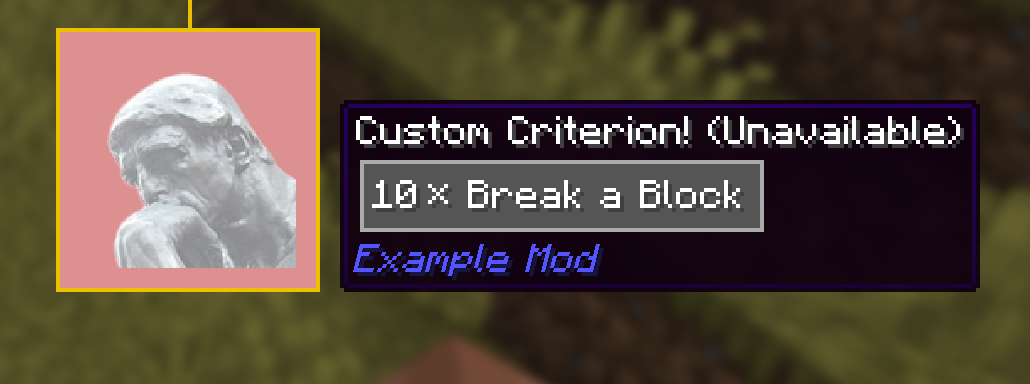
);Lastly, we return a TriggerDisplay, which aggregates TriggerDisplayElements. TriggerDisplay#makeCountElement is yet another helper function which creates an element displaying the research count.
Registering the Handler
Did you think we're done? What a silly thought, we still haven't registered the TriggerHandler yet!
In your client entrypoint:
TriggerHandlerRegistry.register(ExampleCriteriaTriggers.USE_TOOL, UseToolTriggerHandler::new);With the handler registered, everything should be working: